Civic Clarity / Clarity Cloud KB
  • Call us: 248.684-8715
  • Civic Clarity Website
  • AccuNet Website
  • VIEW MODULE DESIGN EXAMPLES
  • AccuNet Website Services Explained
  • ADA Accessibility Guide
  • Add On Features
  • Add On Services
  • Core Modules
  • Creating Users, Menus, Pages & Posts
  • Email
  • Forms
  • General Display Modules
  • In General
  • Media Library & Editing Images
  • Moving Content On A Page
  • Standard Features Explained
  • Technical
  • Unique Modules
  • All Docs

Email

  • SpringMail Overview
    • Introduction
    • Setting up Springmail on devices and apps
    • Migration to SpringMail – Download Contacts from RackMail
    • Change Password in SpringMail
    • Setting Time Zone
  • RackMail Email Overview
    • Introduction
    • Setting up RackMail on devices
    • Prevent a specific sender from landing in your Spam folder (Add to Safelist)
      • SPAM – how to reduce within RackMail
    • Vacation Auto-Reply Message for RackMail
    • Mailbox Full? Options to Consider
    • Email Encryption (SSL / TLS)
    • Help! I’m Having EMail Trouble
    • Change Password
    • Forwarding
    • Filtering
    • Alias Account Management
    • Changing GoDaddy Nameservers in Your Account
    • Signature line
    • Mailbox access blocked – violation of TOS
  1. Home
  2. Email
  3. RackMail Email Overview
  4. Changing GoDaddy Nameservers in Your Account

Changing GoDaddy Nameservers in Your Account

Open GoDaddy

Choose domain

 

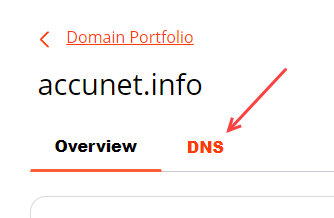
choose DNS option
 

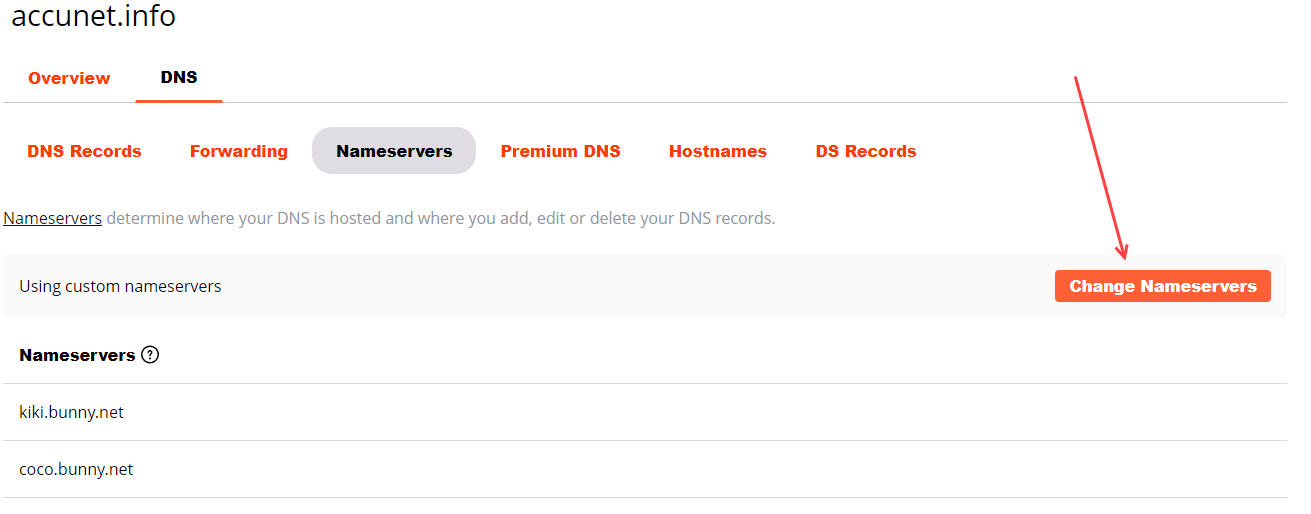
Choose Nameservers tab and then choose the Change Nameservers button
Choose the radial “I’ll use my own nameservers” and add

kiki.bunny.net

coco.bunny.net

Choose SAVE and you’re done.


Updated on February 20, 2024

Doc navigation

← Alias Account ManagementSignature line →
Was this article helpful to you? No Yes

How can we help?

Copyright AccuNet Web Services

©AccuNet Web Services.
Proudly powered by WordPress | Theme: weDocs by Tareq Hasan