Civic Clarity / Clarity Cloud KB
  • Call us: 248.684-8715
  • Civic Clarity Website
  • AccuNet Website
  • VIEW MODULE DESIGN EXAMPLES
  • AccuNet Website Services Explained
  • ADA Accessibility Guide
  • Add On Features
  • Add On Services
  • Core Modules
  • Creating Users, Menus, Pages & Posts
  • Email
  • Forms
  • General Display Modules
  • In General
  • Media Library & Editing Images
  • Moving Content On A Page
  • Standard Features Explained
  • Technical
  • Unique Modules
  • All Docs

Email

  • SpringMail Overview
    • Introduction
    • Setting up Springmail on devices and apps
    • Migration to SpringMail – Download Contacts from RackMail
    • Change Password in SpringMail
    • Setting Time Zone
  • RackMail Email Overview
    • Introduction
    • Setting up RackMail on devices
    • Prevent a specific sender from landing in your Spam folder (Add to Safelist)
      • SPAM – how to reduce within RackMail
    • Vacation Auto-Reply Message for RackMail
    • Mailbox Full? Options to Consider
    • Email Encryption (SSL / TLS)
    • Help! I’m Having EMail Trouble
    • Change Password
    • Forwarding
    • Filtering
    • Alias Account Management
    • Changing GoDaddy Nameservers in Your Account
    • Signature line
    • Mailbox access blocked – violation of TOS
  1. Home
  2. Email
  3. RackMail Email Overview
  4. Change Password

Change Password

Go to webmail:  https://www.myrackmail.com
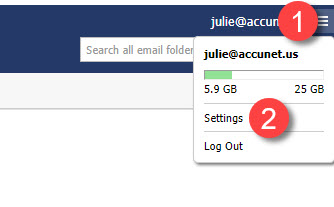
After you login, click on your email address in the upper right.
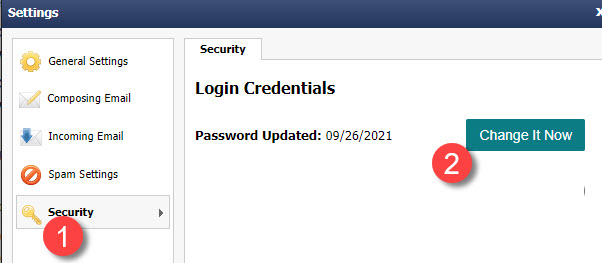
Choose Settings


Updated on June 10, 2022

Doc navigation

← Help! I'm Having EMail TroubleForwarding →
Was this article helpful to you? No Yes 1

How can we help?

Copyright AccuNet Web Services

©AccuNet Web Services.
Proudly powered by WordPress | Theme: weDocs by Tareq Hasan